Analyze your Wealthsimple portfolio
Keep your accounts exactly where they are. Connect Wealthsimple read-only, add whatever else you hold, and get one combined picture: allocation across everything, drift against the targets you set, and a cost base pooled the way the CRA actually pools it.
Starter is free forever. No credit card required.
Luum sits above your brokerage, not instead of it
Luum holds no money, executes nothing and is not a brokerage. It reads what you already own and does the analysis on top. That is the whole relationship, and it is why the connection is read-only and why nothing here suggests moving your account anywhere.
If the question you actually have is whether your brokerage can already do this, that is a different page: can Wealthsimple track your whole portfolio sets out where a brokerage view stops, and why.
Allocation and drift, across everything at once
Set the split you meant to hold and Luum tracks the gap continuously across every account you have connected, not one account at a time. Per-account rebalancing is the most common way a plan quietly stops being the plan, because each account is supposed to be unbalanced once you put the right holdings in the right place.
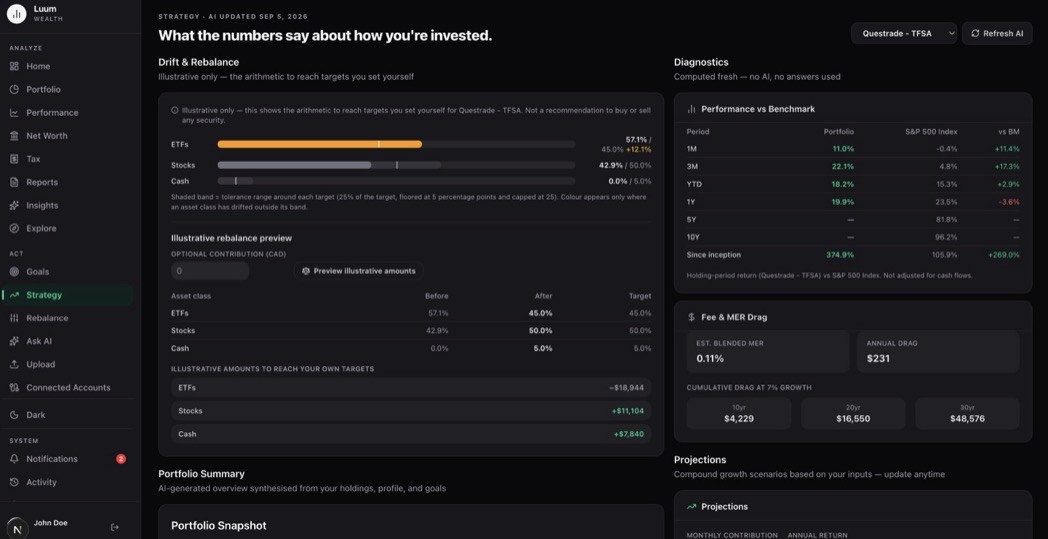
You can try the same arithmetic without an account in the asset allocation and drift calculator, and asset location across accounts explains why the combined view is the one that matters.
A cost base that spans your institutions
If any of your Wealthsimple holdings are non-registered, the number you file is your adjusted cost base, and it is pooled across every institution you hold that security at. Luum keeps the running record from your transaction history, through partial sales, reinvested distributions and return of capital.
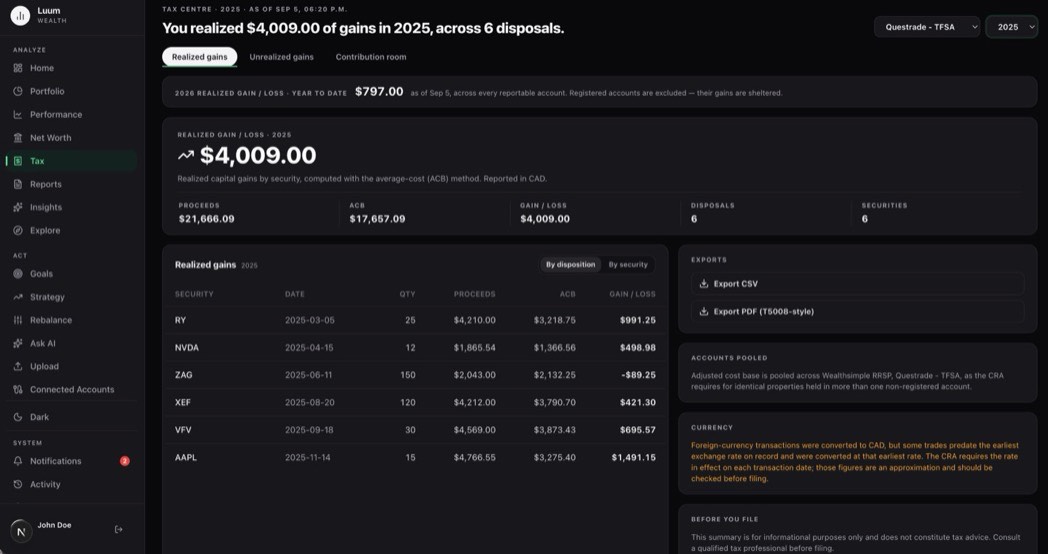
Adjusted cost base for a Wealthsimple account covers the case that catches most people, which is a position that was transferred in from somewhere else.
How the connection works
- Read-only, through Snaptrade. You sign in on your institution’s own page. Your credentials never touch Luum, and there is no order path, so nothing can trade, move cash or change a setting.
- Or no connection at all. Every plan takes a holdings upload and a transaction history import.
- Your data stays in Canada, and you can export everything you have put in whenever you want. See security and connecting brokerages.
Common questions
- Does connecting my Wealthsimple account let anything trade?
- No. The connection is read-only by construction. It can see positions and transactions and it has no order path, so nothing can place a trade, move cash or change a setting. You sign in at your own institution directly, and your credentials never reach Luum.
- Do I have to connect it, or can I upload instead?
- Either. Every plan takes a holdings upload and a transaction history import. Connecting is faster and stays current on its own. For adjusted cost base the distinction matters: an average cost is built from the purchases behind a position, so a holdings snapshot gives you allocation and drift but not a cost base.
- Can I see Wealthsimple alongside accounts at another brokerage?
- That is the case this is built for. Every connected and uploaded account lands in one combined view, with registered and non-registered accounts kept distinct rather than added together, and your targets measured across the whole picture rather than one account at a time.
- Will this replace my Wealthsimple account?
- No. Luum is not a brokerage, holds no money and executes nothing. It reads what you already hold and analyses it, so your accounts stay exactly where they are and work exactly as they did.
- What happens to my adjusted cost base if I hold the same ETF in two places?
- Canada pools identical property per taxpayer rather than per account, so the two positions share one average cost and neither brokerage can compute it. Luum builds the pooled number from the transaction history of every account you connect or upload.
Connect it and see the whole picture
Starter is free forever. No credit card required.